The Basics
- Nextcloud Server version (e.g., 29.x.x):
34.0.5snap3 54531 latest/stable
- Operating system and version (e.g., Ubuntu 24.04):
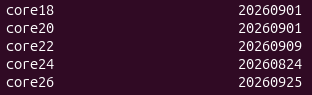
- Ubuntu Core 18
- Web server and version (e.g, Apache 2.4.25):
from snap
- Reverse proxy and version _(e.g. nginx 1.27.2)
from snap
- PHP version (e.g, 8.3):
from snap
- Is this the first time you’ve seen this error? (Yes / No):
y
- When did this problem seem to first start?
occ upgrade from browser, and same from CLI
- Installation method (e.g. AlO, NCP, Bare Metal/Archive, etc.)
Nextcloud snap on Ubuntu Core
- Are you using CloudfIare, mod_security, or similar? (Yes / No)
no
Summary of the issue you are facing:
Trying to run last upgrade
Steps to replicate it (hint: details matter!):
-
snap refresh -
F5 on browser did not display anything so i did a restart
-
sudo snap restart nextcloud -
F5 on browser prompt a full screen notification to upgrade (and says i can run .occ upgrade)
-
I click the upgrade button, error on config writting, so i try from CLI
-
sudo nextcloud.occ upgrade -vvv -
Fails. More details below
Log entries
Nextcloud upgrade log:
sudo nextcloud.occ upgrade -vvv
2026-10-24T08:11:38+00:00 Setting log level to debug
2026-10-24T08:11:38+00:00
2026-10-24T08:11:38+00:00 In Config.php line 313:
2026-10-24T08:11:38+00:00
2026-10-24T08:11:38+00:00   [Exception]
2026-10-24T08:11:38+00:00   /var/snap/nextcloud/54531/nextcloud/config/ does not have enough space for writing the config file! Not writing it back!
2026-10-24T08:11:38+00:00
2026-10-24T08:11:38+00:00
2026-10-24T08:11:38+00:00 Exception trace:
2026-10-24T08:11:38+00:00   at /snap/nextcloud/54531/htdocs/lib/private/Config.php:313
2026-10-24T08:11:38+00:00  OC\Config->writeData() at /snap/nextcloud/54531/htdocs/lib/private/Config.php:142
2026-10-24T08:11:38+00:00  OC\Config->setValue() at /snap/nextcloud/54531/htdocs/lib/private/SystemConfig.php:140
2026-10-24T08:11:38+00:00  OC\SystemConfig->setValue() at /snap/nextcloud/54531/htdocs/lib/private/AllConfig.php:46
2026-10-24T08:11:38+00:00  OC\AllConfig->setSystemValue() at /snap/nextcloud/54531/htdocs/lib/private/Updater.php:79
2026-10-24T08:11:38+00:00  OC\Updater->upgrade() at /snap/nextcloud/54531/htdocs/core/Command/Upgrade.php:196
2026-10-24T08:11:38+00:00  OC\Core\Command\Upgrade->execute() at /snap/nextcloud/54531/htdocs/3rdparty/symfony/console/Command/Command.php:326
2026-10-24T08:11:38+00:00  Symfony\Component\Console\Command\Command->run() at /snap/nextcloud/54531/htdocs/3rdparty/symfony/console/Application.php:1098
2026-10-24T08:11:38+00:00  Symfony\Component\Console\Application->doRunCommand() at /snap/nextcloud/54531/htdocs/3rdparty/symfony/console/Application.php:324
2026-10-24T08:11:38+00:00  Symfony\Component\Console\Application->doRun() at /snap/nextcloud/54531/htdocs/3rdparty/symfony/console/Application.php:175
2026-10-24T08:11:38+00:00  Symfony\Component\Console\Application->run() at /snap/nextcloud/54531/htdocs/lib/private/Console/Application.php:209
2026-10-24T08:11:38+00:00  OC\Console\Application->run() at /snap/nextcloud/54531/htdocs/console.php:92
2026-10-24T08:11:38+00:00  require_once() at /snap/nextcloud/54531/htdocs/occ:33
2026-10-24T08:11:38+00:00
2026-10-24T08:11:38+00:00 upgrade
2026-10-24T08:11:38+00:00
Configuration
Nextcloud
The output of occ config:list system or similar is best, but, if not possible, the contents of your config.php file from /path/to/nextcloud is fine (make sure to remove any identifiable information!):
{
    "system": {
        "apps_paths": [
            {
                "path": "\/snap\/nextcloud\/current\/htdocs\/apps",
                "url": "\/apps",
                "writable": false
            },
            {
                "path": "\/var\/snap\/nextcloud\/current\/nextcloud\/extra-apps",
                "url": "\/extra-apps",
                "writable": true
            }
        ],
        "supportedDatabases": [
            "mysql"
        ],
        "memcache.locking": "\\OC\\Memcache\\Redis",
        "memcache.local": "\\OC\\Memcache\\APCu",
        "redis": {
            "host": "***REMOVED SENSITIVE VALUE***",
            "port": 0
        },
        "log_type": "file",
        "logfile": "\/media\/nextclouda\/logs\/nextcloud.log",
        "logfilemode": 416,
        "maintenance_window_start": 1,
        "instanceid": "***REMOVED SENSITIVE VALUE***",
        "passwordsalt": "***REMOVED SENSITIVE VALUE***",
        "secret": "***REMOVED SENSITIVE VALUE***",
        "trusted_domains": [
            "***REMOVED SENSITIVE VALUE***",
            "***REMOVED SENSITIVE VALUE***"
        ],
        "trusted_proxies": "***REMOVED SENSITIVE VALUE***",
        "datadirectory": "***REMOVED SENSITIVE VALUE***",
        "dbtype": "mysql",
        "version": "34.0.3.2",
        "overwrite.cli.url": "***REMOVED SENSITIVE VALUE***",
        "dbname": "***REMOVED SENSITIVE VALUE***",
        "dbhost": "***REMOVED SENSITIVE VALUE***",
        "dbtableprefix": "oc_",
        "mysql.utf8mb4": true,
        "dbuser": "***REMOVED SENSITIVE VALUE***",
        "dbpassword": "***REMOVED SENSITIVE VALUE***",
        "installed": true,
        "mail_from_address": "***REMOVED SENSITIVE VALUE***",
        "mail_smtpmode": "smtp",
        "mail_sendmailmode": "smtp",
        "mail_domain": "***REMOVED SENSITIVE VALUE***",
        "mail_smtpsecure": "tls",
        "mail_smtpauthtype": "LOGIN",
        "mail_smtpauth": 1,
        "mail_smtphost": "***REMOVED SENSITIVE VALUE***",
        "mail_smtpport": "587",
        "mail_smtpname": "***REMOVED SENSITIVE VALUE***",
        "mail_smtppassword": "***REMOVED SENSITIVE VALUE***",
        "maintenance": false,
        "config_preset": 2,
        "defaultapp": "dashboard,files,calendar,cospend,mail,deck,intravox",
        "app_install_overwrite": [],
        "default_locale": "fr_FR",
        "default_language": "fr",
        "theme": "",
        "loglevel": 2,
        "has_internet_connection": "true"
    }
}
Apps
The output of occ app:list (if possible).
Tips for increasing the likelihood of a response
-
I wish I could configure nextcloud to use a config file somewhere else (like in /media/my_ssd_with_backup_and_writable
-
I think i tryed once with symlink but failed when snap upgrades
-
This works : sudo vi /var/snap/nextcloud/54531/nextcloud/config/config.php
- So maybe I can update this file manualy to dodge the error for this update?
- But it will do the same error next time

-
Tryed to add
read-only=>truein the config just to try, fails:sudo nextcloud.occ upgrade -vvv 2026-10-24T08:05:14+00:00 Setting log level to debug 2026-10-24T08:05:14+00:00 2026-10-24T08:05:14+00:00 In Config.php line 339: 2026-10-24T08:05:14+00:00 2026-10-24T08:05:14+00:00 [OCP\HintException] 2026-10-24T08:05:14+00:00 Config is set to be read-only via option "config_is_read_only". 2026-10-24T08:05:14+00:00 2026-10-24T08:05:14+00:00 2026-10-24T08:05:14+00:00 Exception trace: 2026-10-24T08:05:14+00:00 at /snap/nextcloud/54531/htdocs/lib/private/Config.php:339 2026-10-24T08:05:14+00:00 OC\Config->checkReadOnly() at /snap/nextcloud/54531/htdocs/lib/private/Config.php:281 2026-10-24T08:05:14+00:00 OC\Config->writeData() at /snap/nextcloud/54531/htdocs/lib/private/Config.php:142 2026-10-24T08:05:14+00:00 OC\Config->setValue() at /snap/nextcloud/54531/htdocs/lib/private/SystemConfig.php:140 2026-10-24T08:05:14+00:00 OC\SystemConfig->setValue() at /snap/nextcloud/54531/htdocs/lib/private/AllConfig.php:46 2026-10-24T08:05:14+00:00 OC\AllConfig->setSystemValue() at /snap/nextcloud/54531/htdocs/lib/private/Updater.php:79 2026-10-24T08:05:14+00:00 OC\Updater->upgrade() at /snap/nextcloud/54531/htdocs/core/Command/Upgrade.php:196 2026-10-24T08:05:14+00:00 OC\Core\Command\Upgrade->execute() at /snap/nextcloud/54531/htdocs/3rdparty/symfony/console/Command/Command.php:326 2026-10-24T08:05:14+00:00 Symfony\Component\Console\Command\Command->run() at /snap/nextcloud/54531/htdocs/3rdparty/symfony/console/Application.php:1098 2026-10-24T08:05:14+00:00 Symfony\Component\Console\Application->doRunCommand() at /snap/nextcloud/54531/htdocs/3rdparty/symfony/console/Application.php:324 2026-10-24T08:05:14+00:00 Symfony\Component\Console\Application->doRun() at /snap/nextcloud/54531/htdocs/3rdparty/symfony/console/Application.php:175 2026-10-24T08:05:14+00:00 Symfony\Component\Console\Application->run() at /snap/nextcloud/54531/htdocs/lib/private/Console/Application.php:209 2026-10-24T08:05:14+00:00 OC\Console\Application->run() at /snap/nextcloud/54531/htdocs/console.php:92 2026-10-24T08:05:14+00:00 require_once() at /snap/nextcloud/54531/htdocs/occ:33 2026-10-24T08:05:14+00:00 2026-10-24T08:05:14+00:00 upgrade 2026-10-24T08:05:14+00:00