Support intro
Sorry to hear you’re facing problems. 
The community help forum (help.nextcloud.com) is for home and non-enterprise users. Support is provided by other community members on a best effort / “as available” basis. All of those responding are volunteering their time to help you.
If you’re using Nextcloud in a business/critical setting, paid and SLA-based support services can be accessed via portal.nextcloud.com where Nextcloud engineers can help ensure your business keeps running smoothly.
Getting help
In order to help you as efficiently (and quickly!) as possible, please fill in as much of the below requested information as you can.
Before clicking submit: Please check if your query is already addressed via the following resources:
- Official documentation (searchable and regularly updated)
- How to topics and FAQs
- Forum search
(Utilizing these existing resources is typically faster. It also helps reduce the load on our generous volunteers while elevating the signal to noise ratio of the forums otherwise arising from the same queries being posted repeatedly).
- Nextcloud Server version (e.g., 29.x.x):
31.0.8
- Operating system and version (e.g., Ubuntu 24.04):
22.04
- PHP version (e.g, 8.3):
8.2
- Is this the first time you’ve seen this error? (Yes / No):
Yes
When I create a public link for a file, a generated password (example: 1234$) is displayed first. If I replace this password with my own (e.g., test123) and click on the arrow (to the right of it) or on “Create share,”
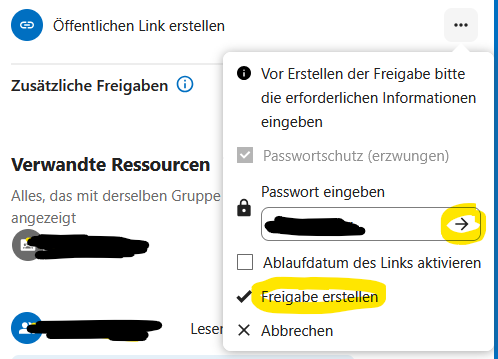
Then open the link and enter test123, I get an error message saying that the link has expired or the password is incorrect. The automatically generated password works.
It only works when I edit the share in Nextcloud (customize link), re-enter the password, and click on Update share.
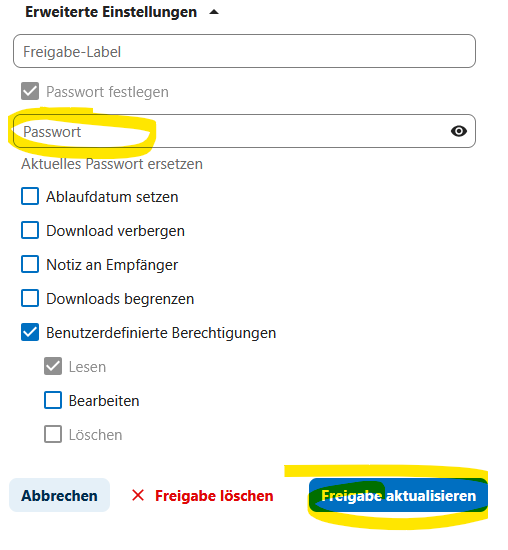
Is there a solution to this problem? Is this problem known?