Some or all of the below information will be requested if it isn’t supplied; for fastest response please provide as much as you can. 
The Basics
- Nextcloud Server version (e.g., 29.x.x):
35.0.2.2
- Operating system and version (e.g., Ubuntu 24.04):
Debian 13 trixie
- Web server and version (e.g, Apache 2.4.25):
2.4.69-1~deb13u1
- Reverse proxy and version _(e.g. nginx 1.27.2)
N/A
- PHP version (e.g, 8.3):
8.4.27
- Is this the first time you’ve seen this error? (Yes / No):
No
- When did this problem seem to first start?
Several months ago
- Installation method (e.g. AlO, NCP, Bare Metal/Archive, etc.)
Downloaded a ZIP file and installed from that.
- Are you using CloudfIare, mod_security, or similar? (Yes / No)
No
Summary of the issue you are facing:
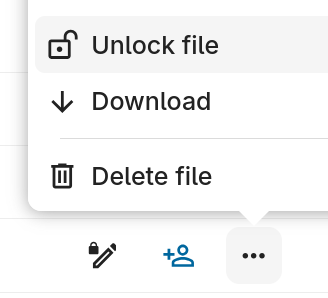
I have a file which is locked, and cannot unlock it.
Locking shows up in the file system as no write permission: -r--r--r--. chmod u+x is only a temporary relief. I would like a more permanent (and more user or administrator friendly) solution.
Searching here showed nothing. Searching on the Internet showed two methods, both of which failed.
Steps to replicate it (hint: details matter!):
- I have no idea how this happened so I have no idea how to replicate it.
Log entries
Nextcloud
Please provide the log entries from your Nextcloud log that are generated during the time of problem (via the Copy raw option from Administration settings->Logging screen or from your nextcloud.log located in your data directory). Feel free to use a pastebin/gist service if necessary.
{
  "reqId": "Nthyvzt2CoP8dQ7xfQne",
  "level": 3,
  "time": "2026-10-31T19:59:05+00:00",
  "remoteAddr": "97.245.236.164",
  "user": "charles",
  "app": "webdav",
  "method": "PUT",
  "url": "/remote.php/dav/files/charles/Notes/Shopping%20List.md",
  "scriptName": "/remote.php",
  "message": "Exception thrown: Sabre\\DAV\\Exception\\Locked",
  "userAgent": "Mozilla/5.0 (Linux) mirall/3.16.7-1~deb13u1 (Debian built) (Nextcloud, debian-6.12.113+deb13-amd64 ClientArchitecture: x86_64 OsArchitecture: x86_64)",
  "version": "35.0.2.2",
  "clientReqId": "6eb18f43-304a-43f6-8fe0-4e6e5df39d17",
  "exception": {
    "Exception": "Sabre\\DAV\\Exception\\Locked",
    "Message": "",
    "Code": 0,
    "Trace": [
      {
        "file": "/var/www/nextcloud/3rdparty/sabre/event/lib/WildcardEmitterTrait.php",
        "line": 89,
        "function": "validateTokens",
        "class": "Sabre\\DAV\\Locks\\Plugin",
        "type": "->",
        "args": [
          "*** sensitive parameters replaced ***"
        ]
      },
      {
        "file": "/var/www/nextcloud/3rdparty/sabre/dav/lib/DAV/Server.php",
        "line": 1448,
        "function": "emit",
        "class": "Sabre\\DAV\\Server",
        "type": "->"
      },
      {
        "file": "/var/www/nextcloud/3rdparty/sabre/dav/lib/DAV/Server.php",
        "line": 466,
        "function": "checkPreconditions",
        "class": "Sabre\\DAV\\Server",
        "type": "->"
      },
      {
        "file": "/var/www/nextcloud/apps/dav/lib/Connector/Sabre/Server.php",
        "line": 216,
        "function": "invokeMethod",
        "class": "Sabre\\DAV\\Server",
        "type": "->"
      },
      {
        "file": "/var/www/nextcloud/apps/dav/lib/Server.php",
        "line": 435,
        "function": "start",
        "class": "OCA\\DAV\\Connector\\Sabre\\Server",
        "type": "->"
      },
      {
        "file": "/var/www/nextcloud/apps/dav/appinfo/v2/remote.php",
        "line": 25,
        "function": "exec",
        "class": "OCA\\DAV\\Server",
        "type": "->"
      },
      {
        "file": "/var/www/nextcloud/remote.php",
        "line": 158,
        "args": [
          "/var/www/nextcloud/apps/dav/appinfo/v2/remote.php"
        ],
        "function": "require"
      },
      {
        "file": "/var/www/nextcloud/lib/OC.php",
        "line": 1403,
        "function": "{closure:/var/www/nextcloud/remote.php:102}",
        "args": [
          "*** sensitive parameters replaced ***"
        ]
      },
      {
        "file": "/var/www/nextcloud/remote.php",
        "line": 102,
        "function": "handleRequests",
        "class": "OC",
        "type": "::"
      }
    ],
    "File": "/var/www/nextcloud/3rdparty/sabre/dav/lib/DAV/Locks/Plugin.php",
    "Line": 504,
    "message": "",
    "CustomMessage": "Exception thrown: Sabre\\DAV\\Exception\\Locked"
  },
  "id": "6ae6488d2157d"
}
Web Browser
If the problem is related to the Web interface, open your browser inspector Console and Network tabs while refreshing (reloading) and reproducing the problem. Provide any relevant output/errors here that appear.
N/A
Web server / Reverse Proxy
The output of your Apache/nginx/system log in /var/log/____:
Configuration
Nextcloud
The output of occ config:list system or similar is best, but, if not possible, the contents of your config.php file from /path/to/nextcloud is fine (make sure to remove any identifiable information!):
root@hawk:~# cd /var/www/nextcloud/ && su www-data -c "php /var/www/nextcloud/occ config:list system"
{
    "system": {
        "instanceid": "***REMOVED SENSITIVE VALUE***",
        "passwordsalt": "***REMOVED SENSITIVE VALUE***",
        "secret": "***REMOVED SENSITIVE VALUE***",
        "trusted_domains": [
            "nextcloud.curleynet.mywire.org:17800"
        ],
        "datadirectory": "***REMOVED SENSITIVE VALUE***",
        "dbtype": "pgsql",
        "version": "35.0.2.2",
        "overwrite.cli.url": "https:\/\/nextcloud.curleynet.mywire.org:17800",
        "dbname": "***REMOVED SENSITIVE VALUE***",
        "dbhost": "***REMOVED SENSITIVE VALUE***",
        "dbtableprefix": "oc_",
        "dbuser": "***REMOVED SENSITIVE VALUE***",
        "dbpassword": "***REMOVED SENSITIVE VALUE***",
        "default_phone_region": "US",
        "installed": true,
        "config_preset": 2,
        "maintenance": false,
        "maintenance_window_start": 1,
        "mail_domain": "***REMOVED SENSITIVE VALUE***",
        "mail_from_address": "***REMOVED SENSITIVE VALUE***",
        "mail_smtpmode": "smtp",
        "mail_smtphost": "***REMOVED SENSITIVE VALUE***",
        "mail_sendmailmode": "smtp",
        "mail_smtpstreamoptions": {
            "ssl": {
                "allow_self_signed": false,
                "verify_peer": true,
                "verify_peer_name": true
            }
        },
        "mail_smtppassword": "***REMOVED SENSITIVE VALUE***",
        "mail_smtpname": "***REMOVED SENSITIVE VALUE***",
        "mail_smtpauth": true,
        "mail_smtpport": "465",
        "memcache.local": "\\OC\\Memcache\\APCu",
        "memcache.locking": "\\OC\\Memcache\\Redis",
        "redis": {
            "host": "***REMOVED SENSITIVE VALUE***",
            "port": 6379,
            "dbindex": 0,
            "timeout": 1.5
        },
        "loglevel": 2
    }
}
root@hawk:/var/www/nextcloud#
Apps
The output of occ app:list (if possible).
root@hawk:/var/www/nextcloud# cd /var/www/nextcloud/ && su www-data -c "php /var/www/nextcloud/occ app:list"
Enabled:
  - activity: 8.0.0
  - app_api: 35.0.0
  - appstore: 2.0.0
  - bruteforcesettings: 8.0.0
  - calendar: 6.6.4
  - circles: 35.0.0
  - cloud_federation_api: 2.0.0
  - comments: 2.0.0
  - contacts: 8.9.3
  - contactsinteraction: 2.0.0
  - dashboard: 8.0.0
  - dav: 2.0.0
  - federatedfilesharing: 2.0.0
  - federation: 2.0.0
  - files: 3.0.0
  - files_downloadlimit: 5.3.0
  - files_lock: 35.0.1
  - files_pdfviewer: 8.0.0
  - files_reminders: 2.0.0
  - files_sharing: 2.0.0
  - files_trashbin: 2.0.0
  - files_versions: 2.0.0
  - firstrunwizard: 8.0.0
  - guests: 4.10.1
  - logreader: 8.0.0
  - lookup_server_connector: 2.0.0
  - mail: 5.12.6
  - maps: 1.8.0
  - nextcloud_announcements: 7.0.0
  - notes: 6.1.0
  - notifications: 8.0.1
  - oauth2: 2.0.0
  - office: 1.1.0
  - password_policy: 7.0.0
  - photos: 8.0.0
  - privacy: 7.0.0
  - profile: 2.0.0
  - provisioning_api: 2.0.0
  - recommendations: 8.0.0
  - related_resources: 6.0.0
  - richdocuments: 12.0.1
  - serverinfo: 7.0.0
  - settings: 2.0.0
  - sharebymail: 2.0.0
  - sharing: 1.0.4
  - support: 7.0.0
  - survey_client: 7.0.0
  - suspicious_login: 13.0.0
  - systemtags: 2.0.0
  - text: 9.0.1
  - theming: 3.0.0
  - twofactor_backupcodes: 2.0.0
  - twofactor_totp: 17.1.0
  - updatenotification: 2.0.0
  - user_status: 2.0.0
  - viewer: 8.0.0
  - weather_status: 2.0.0
  - webhook_listeners: 2.0.0
  - workflowengine: 3.0.0
Disabled:
  - admin_audit: 2.0.0
  - encryption: 3.0.1
  - files_external: 2.0.0
  - richdocumentscode: 26.4.502 (installed 26.4.502)
  - twofactor_nextcloud_notification: 9.0.0
  - twofactor_webauthn: 2.7.1
  - user_ldap: 2.0.0
root@hawk:/var/www/nextcloud#
Tips for increasing the likelihood of a response
- Use the
preformatted textformatting option in the editor for all log entries and configuration output. - If screenshots are useful, feel free to include them.
- If possible, also include key error output in text form so it can be searched for.
- Try to edit log output only minimally (if at all) so that it can be ran through analyzers / formatters by those trying to help you.