running CODE container as custom UID
hint only relevant for “real” Docker users (rootless/podman/K8n work different).
problem
COOL uses hardcoded UID 1001 to start coolwsd:
so with classic “rootfull” Docker it ends up running whatever user has UID 1001 on your system. In general it is not an issue as COOL/CODE container is really secure by default and never runs as root.. But personally I prefer to separate services using custom UID - because of security but also because of convenience - especially if you run multiple instances of the same application e.g. test and prod Nextcloud - by default it’s hard to know to which instance any of database or apache or nginx processes belongs. if each instance has it’s own user it’s easy to see which one is consuming resources - simply using ps aux you already see the application in the first raw, try ps -Ao user,uid,pid,comm --sort=uid
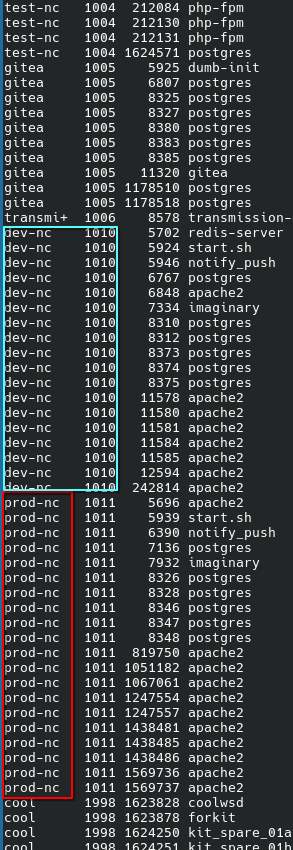
for this reason I tried hard to make it work for CODE Docker image - which is not easy because the UID 1001 is baked into an image and you can’t simply add user: 1234:1234 to a docker-compose. But fortunately solution exists already because OpenShift always run images using custom UID and there is small hack included in the CODE image:
solution
with help from very supportive Collabora people (thx Darshan  ) I crafted this instructions.
 → run command from the directory whee your docker-compose file lives.
- create the user to run COOL/CODE
I’m using 1998 as user id - adjust to your needs (but keep the name cool)
sudo useradd --no-create-home --shell /usr/sbin/nologin --uid 1998 cool
- required host directories
create directories on the host to use as volume mounts and adjust user rights for host directories
→ this is required to overwrite directories built-in in the Docker image owned by user 1001
mkdir -p ./cool/child-roots ./cool/cache ./cool/tmp
sudo chown -R 1998:0 ./cool/child-roots ./cool/cache ./cool/tmp
sudo chmod -R g+rwx  ./cool/child-roots ./cool/cache ./cool/tmp
- download the SElinux profile
from: online/docker/cool-seccomp-profile.json at main · CollaboraOnline/online · GitHub
wget https://raw.githubusercontent.com/CollaboraOnline/online/refs/heads/main/docker/cool-seccomp-profile.json -o ./cool/cool-seccomp-profile.json
- directories should now look like below (take into account the group is
0which equals root)
$ ls -al ./cool
drwxrwxr-x+  6 cool cool  4096 Aug 10 19:38 .
drwxrwxr-x+ 10 root root  4096 Aug 10 19:51 ..
drwxrwxr-x+  4 cool root  4096 Aug 10 19:39 cache
drwxrwx---   3 cool root  4096 Aug 10 19:38 child-roots
drwxr-xr-x+  2 cool cool  4096 May 29 21:50 code_no_welcome
-rw-rw-r--+  1 cool cool 16029 Aug  8 19:54 cool-seccomp-profile.json
drwxrwxr-x+  2 cool root  4096 Aug 10 19:36 tmp

$ ls -aln cool
drwxrwxr-x+  6 1998 1998  4096 Aug 11 19:19 .
drwxrwxr-x+ 11    0    0  4096 Aug 11 20:07 ..
drwxrwxr-x+  4 1998    0  4096 Aug 11 19:22 cache
drwxrwx---   3 1998    0  4096 Aug 11 19:21 child-roots
drwxr-xr-x+  2 1998 1998  4096 May 29 21:50 code_no_welcome
-rw-rw-r--+  1 1998 1998 16029 Aug  8 19:54 cool-seccomp-profile.json
-rw-r--r--+  1 1998 1998 43631 Aug  6 20:08 coolwsd.xml
-rwxrwxrwx+  1 1998 1998    46 Aug 11 19:19 passwd
drwxrwxr-x+  2 1998    0  4096 Aug 11 19:20 tmp
- adjust your compose file
- add
user: 1998:0 - add
security_optsection - bind mount referring the 3 directories above
services:
  collabora:
    image: collabora/code:${CODE_VERSION}
    container_name: collabora
    restart: unless-stopped
    user: 1998:0
    security_opt:
      - seccomp:./cool/cool-seccomp-profile.json
      - apparmor:unconfined
...
    volumes:
      - ./cool/child-roots:/opt/cool/child-roots
      - ./cool/cache:/opt/cool/cache
      - ./cool/tmp:/tmp
      - ./cool/code_no_welcome:/usr/share/coolwsd/browser/dist/welcome:ro
/cool/code_no_welcome - is not relevant for this guide but is nifty trick to remove welcome banner on first connection.
- restart your CODE container
docker compose down collabora && docker compose up -d collabora
- final checks
- review if the container is “healthy” and returns if the proper discovery information and if there are errors in the log (
docker compose ps,../hosting/discovery,docker compose logs collabora) - and finally the process runs with a UID of 1998 (cool) and the there is no audit warning

$ ps -au |grep coolwsd
cool      178201  0.7  0.1 593976 79748 pts/0    Ssl+ 19:38   0:02 /usr/bin/coolwsd --use-env-vars --o:sys_template_path=/opt/cool/systemplate --o:child_root_path=/opt/cool/child-roots --o:file_server_root_path=/usr/share/coolwsd --o:cache_files.path=/opt/cool/cache --o:logging.color=false --o:stop_on_config_change=true
cool      178371  0.6  0.5 631980 363640 pts/0   S+   19:38   0:02 /usr/bin/coolforkit-ns --systemplate=/opt/cool/systemplate --lotemplate=/opt/collaboraoffice --childroot=/opt/cool/child-roots/1-06FBE50F/ --clientport=9980 --masterport=coolwsd-DleInVI2 --rlimits=limit_virt_mem_mb:0;limit_stack_mem_kb:8000;limit_file_size_mb:0;limit_num_open_files:0 --version --ui=classic --namespace