Hi Nextcloud-Pros,
- Nextcloud Server version :
- Nextcloud Hub 26 Summer (35.0.2)
- Operating system and version:
- Managed Server @ all-inkl.com
- Linux dd51614 6.8.0-149-generic #149-Ubuntu SMP PREEMPT_DYNAMIC Fri Oct 23 13:21:10 UTC 2026 x86_64
- Web server and version (e.g, Apache 2.4.25):
- Apache
- Reverse proxy and version _(e.g. nginx 1.27.2)
- unknown
- PHP version (e.g, 8.3):
- 8.5
- Is this the first time you’ve seen this error? (Yes / No):
- Yes
- When did this problem seem to first start?
- 30.10.2026
- Installation method (e.g. AlO, NCP, Bare Metal/Archive, etc.)
- AIO
- Are you using CloudfIare, mod_security, or similar? (Yes / No)
- No
Last friday, a user told me, that he had tried to update his Nextcloud Sync Client. During installation process, some error messages appeared, that the user didn’t remember. He had to reboot his Windows 11 Home notebook 3 times. After that, he couldn’t access the Nextcloud sync folder anymore.
When I checked the computer, I first saw, that the folder icon had changed from the typical Nextcloud Symbol to something different.

This folder was not accessable by the Windows Explorer and additionaly, it also was not deletable.
I tried a repair installation for the Nextcloud client, what didn’t solve the problem.
Thus, I completely deinstalled Nextcloud.exe and reinstalled it from scratch. And I selected a completely new sync folder and set up synchronisation as virtual folder.
After that, everything seemed to be correct, although the old, damaged sync folder still existed and could not be accessed or deleted.
On Monday, the user told me, that he couldn’t open some PDF files.
This error message appeared, when he tried to open them with Windows Explorer:
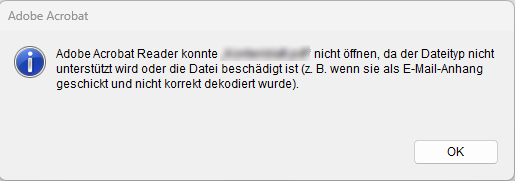
English translation: “Adobe Acrobat Reader could not open file because the file type is not supported or the file is corrupted (for example, if it was sent as an email attachment and was not decoded correctly).”
The astonishing thing is, that this error message appears for some PDF files while other PDF files can be opened as usual.
Additionally, this only happens with PDF files, while Word doc files can be opened without any problems.
On a completely different Computer, exactly the same happens. In other words: It doesn’t seem to be a problem of the computer mentioned above.
At first, I thought the files were corrupted. But when I log in to my Nextcloud installation via a browser, I can open them just fine. And when I download them and then open them, they work perfectly.
Does anyone have an idea, what the reason for this problem could be? And how to solve this problem?
Thank you in advance for any tipp.
Bfn
Michael